JTTY on an Android phone: an example QSO and a crib sheet
Updated 5 October: a POTA mode that sends your park reference, a QTH setting, transmitting on the station you tap, a CQ loop, and why some messages take more frames than others.
JTTY is the new keyboard mode in WSJT-X 3.2. It works like RTTY: there are no timed sequences, you type, and the other station answers when they like. But it is far better at weak signals and makes far fewer errors. A signal is about 127 Hz wide, and text arrives in frames of 1.9 seconds.
I’ve been writing an Android app for it, jtty-android. It runs the IC-705 over WiFi through wfview, so the phone is the whole station: waterfall, decoder, macros and log. It has three sets of F-keys: Contest (WSJT-X’s own), Casual and POTA. This post is the crib sheet I wish I’d had for the first few QSOs.
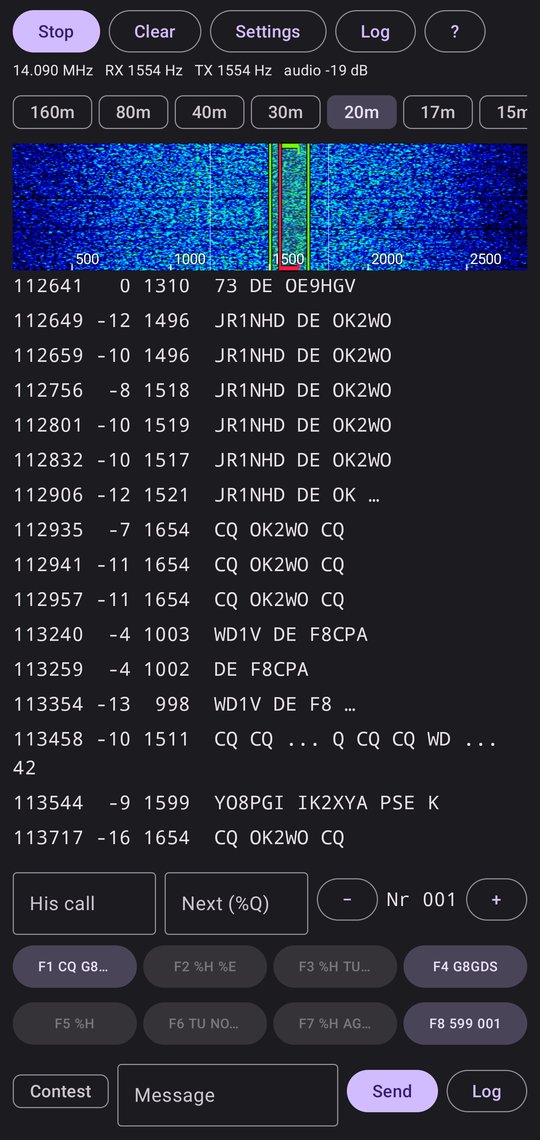
jtty-android on 20 m (14.090 MHz) on 5 October
Setting it up
The phone talks to wfview over the network: CAT through wfview’s rigctld server (port 4533) and audio through its TCI server (port 50001). Two settings caught me out, and neither one shows an error when it’s wrong:
- wfview: Settings → Radio Access → Audio System must be TCI Audio. Otherwise the TCI connection succeeds, and wfview even sends S-meter readings, but no audio. The app’s waterfall stays black while wfview’s own waterfall runs happily, because wfview’s comes from the radio’s scope, not from the audio. The app now says “wfview is connected but sending no audio (is its Audio System set to TCI Audio?)”.
- IC-705: the DATA MOD input must be WLAN, not USB. Otherwise PTT keys the radio, but it transmits nothing.
If the radio is off, wfview still accepts the connection but sends nothing at all, and the app says “wfview is sending nothing: is the radio on and connected to wfview?”. Switch it on and the app picks the audio up again by itself.
In the app’s Settings, fill in your call, grid, name, QTH and rig once. The macros use them, so you don’t have to type them during a QSO.
Reading a line
112649 -12 1496 JR1NHD DE OK2WO
| Part | Meaning |
|---|---|
112649 |
UTC time the message started (HHMMSS) |
-12 |
SNR in dB, on the same scale as FT8 |
1496 |
Audio frequency in Hz |
JR1NHD DE OK2WO |
The message: OK2WO calling JR1NHD |
A trailing … means more frames are still arriving. x ... y means a frame was lost in the middle (fading). A fragment such as KON means the start was missed.
Tap a line to reply. That fills in His call and moves both your RX (green) and TX (red) frequencies onto the station.
That TX move matters. The station you call only decodes its own RX window (its frequency ± 50 Hz) and WSJT-X’s fixed 1200–1800 Hz search, so a call from anywhere else may never be seen. When you’re the one calling CQ, callers come to you instead: Hold TX frequency in Settings keeps your TX still while tapping callers moves only RX.
An example casual QSO
With the mode chip (next to Message) on Casual, the eight F-keys run in the order a QSO uses them. Here I answer W9XYZ’s CQ:
| Sent | Key | |
|---|---|---|
| W9XYZ | CQ W9XYZ CQ |
(tap the line) |
| Me | W9XYZ G8GDS |
F2 |
| W9XYZ | G8GDS 599 EN60 |
|
| Me | W9XYZ TNX 599 IO70 |
F4 |
| Me | W9XYZ OP PETER QTH PENZANCE |
F5 |
| Me | W9XYZ RIG IC705 5W |
F6 |
| W9XYZ | G8GDS OP JOHN TU 73 |
|
| Me | W9XYZ TU 73 |
F7, then Log |
When I’m the one calling CQ, it’s F1, then F3 (W9XYZ 599 IO70) to whoever answers, then F5, F6 and F7 the same way. Turn on Hold TX frequency for that, so tapping a caller doesn’t move your TX.
CQ loop: long-press F1 and it keeps calling, 15 seconds after each CQ ends (adjustable in Settings). It stops by itself when a message with my call arrives, or as soon as I press another key, type, tap a station or press Stop loop. A plain tap on F1 still sends a single CQ.
While His call is filled in, the app decodes only my RX window, so the transcript stays quiet during the QSO. Pressing Log saves the QSO, clears His call and goes back to searching the whole band.
An example contest QSO
With the chip on Contest, the keys are WSJT-X’s own JTTY defaults: 599 plus a serial number.
| Sent | Key | |
|---|---|---|
| W9XYZ | CQ W9XYZ CQ |
(tap the line) |
| Me | G8GDS |
F4 |
| W9XYZ | G8GDS 599 107 |
|
| Me | W9XYZ 599 001 |
F2, then Log (the serial moves on to 002) |
| W9XYZ | TU W9XYZ CQ |
Send your own call to answer a CQ (F4). F5 sends only his call: he won’t know who’s calling, and you’ll get a QRZ?. I learned that on air.
An example POTA activation
With the chip on POTA, a My park field appears next to His call (GB-0123, or GB-0123,GB-0456 for a two-fer). FT8 can only say “POTA” in a CQ; JTTY sends free text, so the park reference itself goes over the air.
| Sent | Key | |
|---|---|---|
| Me | CQ G8GDS CQ POTA GB-0123 |
F1 |
| W9XYZ | G8GDS W9XYZ |
(tap the line) |
| Me | W9XYZ 599 IO70 |
F2 |
| W9XYZ | G8GDS 599 EN60 RR 73 |
|
| Me | W9XYZ TU CQ G8GDS CQ |
Log, then F3 for the next hunter |
Between QSOs, F6 is a one-frame CQ G8GDS CQ: anyone tuning in has had the park from F1. When a hunter asks PARK?, F5 sends it again. An activator runs a CQ, so Hold TX frequency is worth turning on here, and long-pressing F1 starts the CQ loop.
Hunting works in any mode. Tap an activator’s CQ W9XYZ CQ POTA US-0005 and the log form picks up his park. In POTA mode, F8 calls another activator with your own park for a park-to-park: W9XYZ G8GDS GB-0123.
Crib sheet
Words you’ll see
| On screen | Meaning |
|---|---|
CQ K1ABC CQ |
K1ABC calling anyone |
W9XYZ K1ABC |
Two calls: to W9XYZ, from K1ABC |
W9XYZ DE K1ABC |
DE = from: to W9XYZ, from K1ABC |
599 |
Signal report (contest style always sends 599) |
599 107 |
Report and serial number (their QSO #107) |
EN60, IO70 |
Grid locator |
OP JOHN |
Operator’s name |
QTH TRURO |
Where they are |
TU |
Thank you, QSO complete |
TU NOW W7UVW |
Thanks, now working W7UVW (next in line) |
AGN? NR? |
Send again / send your number again |
QRZ? |
Who is calling? Send your call |
RR QSL |
All received |
73 |
Best wishes |
CQ … POTA GB-0123 |
An activator in park GB-0123 (Parks on the Air) |
PARK? |
Send your park reference again |
P2P |
Park-to-park: both stations in parks |
Casual F-keys
| Key | Macro | Sends | Frames |
|---|---|---|---|
| F1 | CQ %M CQ |
CQ G8GDS CQ |
1 |
| F2 | %H %M |
W9XYZ G8GDS |
2 |
| F3 | %H 599 %G |
W9XYZ 599 IO70 |
2 |
| F4 | %H TNX 599 %G |
W9XYZ TNX 599 IO70 |
3 |
| F5 | %H OP %N QTH %T |
W9XYZ OP PETER QTH PENZANCE |
6 |
| F6 | %H RIG %K |
W9XYZ RIG IC705 5W |
4 |
| F7 | %H TU 73 |
W9XYZ TU 73 |
2 |
| F8 | %H AGN? |
W9XYZ AGN? |
1 |
POTA F-keys
| Key | Macro | Sends | Frames |
|---|---|---|---|
| F1 | CQ %M CQ POTA %P |
CQ G8GDS CQ POTA GB-0123 |
4 |
| F2 | %H 599 %G |
W9XYZ 599 IO70 |
2 |
| F3 | %H TU CQ %M CQ |
W9XYZ TU CQ G8GDS CQ |
2 |
| F4 | %H AGN? |
W9XYZ AGN? |
1 |
| F5 | %H %P |
W9XYZ GB-0123 |
3 |
| F6 | CQ %M CQ |
CQ G8GDS CQ |
1 |
| F7 | %H RR 73 |
W9XYZ RR 73 |
2 |
| F8 | %H %M %P |
W9XYZ G8GDS GB-0123 (park-to-park) |
4 |
Contest F-keys (WSJT-X 3.2 defaults)
| Key | Macro | Sends |
|---|---|---|
| F1 | CQ %M CQ |
CQ G8GDS CQ |
| F2 | %H %E |
W9XYZ 599 001 |
| F3 | %H TU CQ %M CQ |
W9XYZ TU CQ G8GDS CQ |
| F4 | %M |
G8GDS |
| F5 | %H |
W9XYZ |
| F6 | TU NOW %Q %E |
TU NOW W7UVW 599 001 |
| F7 | %H AGN? |
W9XYZ AGN? |
| F8 | %E |
599 001 |
Placeholders
| Becomes | |
|---|---|
%M |
My call |
%H |
His call |
%G |
My grid |
%N |
My name |
%T |
My QTH |
%K |
My rig |
%P |
My park (POTA) |
%E |
The exchange: 599 + serial (contest), or 599 + grid (casual) |
%Q |
The next caller in line (contest) |
%R |
His SNR as I decode him, FT8-style (-12, +05) |
A key whose placeholder is empty is greyed out. Pressing it says what’s missing, for example “F5 needs My name in Settings”.
Frames cost time
Each frame takes 1.9 seconds and carries one of two things: a compact atom the protocol knows (a call, a whole CQ G8GDS CQ, 599 IO70, a Field Day class), or up to 5 characters of free text. Calls, grids, reports and serials are cheap; anything else is spelled out 5 characters at a time.
That explains the odd costs. A park reference isn’t an atom, so GB-0123 is always 2 frames (GB-01 + 23). Worse, a word inside a CQ breaks the atom, and the whole message falls back to free text, callsign and all:
| Message | How it packs | Frames |
|---|---|---|
CQ G8GDS CQ |
[CQ G8GDS CQ] |
1 |
CQ POTA G8GDS |
[CQ PO] [TA G8] [GDS] |
3 |
CQ POTA G8GDS GB-0123 |
[CQ PO] [TA G8] [GDS G] [B-012] [3] |
5 |
CQ G8GDS CQ POTA GB-0123 |
[CQ G8GDS CQ] [POTA] [GB-01] [23] |
4 |
W9XYZ TU CQ G8GDS CQ |
[W9XYZ TU] [CQ G8GDS CQ] |
2 |
So the POTA keys keep the CQ whole and put POTA and the park after it. Some more costs:
| Message | Frames |
|---|---|
CQ G8GDS CQ |
1 |
W9XYZ 599 IO70 |
2 |
W9XYZ -12 IO70 |
3 |
W9XYZ OP PETER |
3 |
W9XYZ QTH PENZANCE |
4 |
W9XYZ OP PETER QTH PENZANCE |
6 |
W9XYZ OP PETER RIG IC705 5W |
6 |
CQ CQ DE G8GDS G8GDS K |
5 |
That’s why the casual keys send 599 rather than a real SNR: -12 costs a frame more. %R is there if you want it.
Logging
Log, next to Send, opens a form filled in from the transcript:
- the start time, from his first message or my first call to him
- the frequency, from the dial plus my TX offset
- the report I sent
- his report and grid, or his serial in a contest
- his park, if he sent one, and mine in POTA mode
Anything can be corrected before saving. Log in the top bar lists the QSOs, and Export ADIF shares the log file.
Parks go in the standard ADIF fields: mine as MY_SIG POTA / MY_SIG_INFO, his as SIG POTA / SIG_INFO. After an activation, Export POTA shares the day’s QSOs from my park in the file pota.app expects, named like G8GDS@GB-0123-20261005.adi (one file per park for a two-fer).
ADIF has no JTTY mode yet, so QSOs are written as MODE MFSK, SUBMODE JTTY, which is what WSJT-X 3.2 does too. QRZ and desktop loggers take them, but LoTW won’t until TQSL learns the submode.
Links
- WSJT-X 3.2 User Guide, which covers JTTY
- My earlier post on wfview audio switching