QRZ, LoTW and Club Log: How They Fit Together
Upload every QSO to all three services. Each has a different job. Only one of them copies your QSOs on to another: Club Log can sign and upload them to LoTW for you.
The three services at a glance
| Service | Run by | What it is for | Do its confirmations count for ARRL DXCC? |
|---|---|---|---|
| LoTW (Logbook of The World) | ARRL | The official confirmation system for awards such as DXCC, WAS and VUCC | Yes |
| QRZ Logbook | QRZ.com | An online logbook tied to your QRZ page, plus QRZ’s own awards | No, only QRZ’s own awards |
| Club Log | Volunteers, led by G7VJR | DXCC tracking and league tables, “most wanted” lists, DXpedition QSL requests (OQRS), and optionally signing and uploading your QSOs to LoTW | It shows LoTW and paper confirmations you give it, but it doesn’t grant them |
In short: LoTW proves a contact, Club Log tracks your DXCC progress, and QRZ is the logbook other people see.
Worked vs confirmed
Worked means the contact is in your log. Confirmed means the other station’s log matches yours. Only confirmed contacts count towards awards.
A match needs the same callsigns, band and mode, with times within about 30 minutes of each other. If either side has a typo, a wrong band or a clock that’s badly off, the contact stays “worked” for good. It won’t fix itself.
| Service | What counts as confirmed | Who has to do something |
|---|---|---|
| LoTW | Both stations uploaded matching, digitally signed QSOs | You and the other station, each signing with TQSL or through a Trusted Partner such as Club Log |
| QRZ Logbook | Both stations have the QSO in their QRZ logbooks, or QRZ imported the confirmation from LoTW | Both stations, or an LoTW import |
| Club Log | Club Log has matched it against the LoTW confirmations or paper QSLs you supplied | You, by feeding in LoTW data or marking paper cards |
Why the numbers never quite agree
Expect each service to show a slightly different total. That’s normal.
- Different timing. A contact can be confirmed in LoTW today and only show in Club Log or QRZ after their next import.
- Different DXCC rules. Each service decides which DXCC entity a callsign belongs to. Club Log keeps its own exceptions list, so a few calls land differently. For example, KG4 calls are Guantanamo Bay except the two-letter-suffix ones.
- Deleted entities. Some count lists include entities that no longer exist, and some leave them out.
- Missing uploads. If a QSO never reached a service, it can’t be counted there.
For DXCC itself, LoTW’s number is the one that matters. Use Club Log to see what’s missing, then check whether the gap is real.
How they sync
Mostly, the services don’t send your QSOs to each other. Two things can move between them, and only if you set them up: LoTW confirmations going out to QRZ and Club Log, and your QSOs going from Club Log into LoTW.
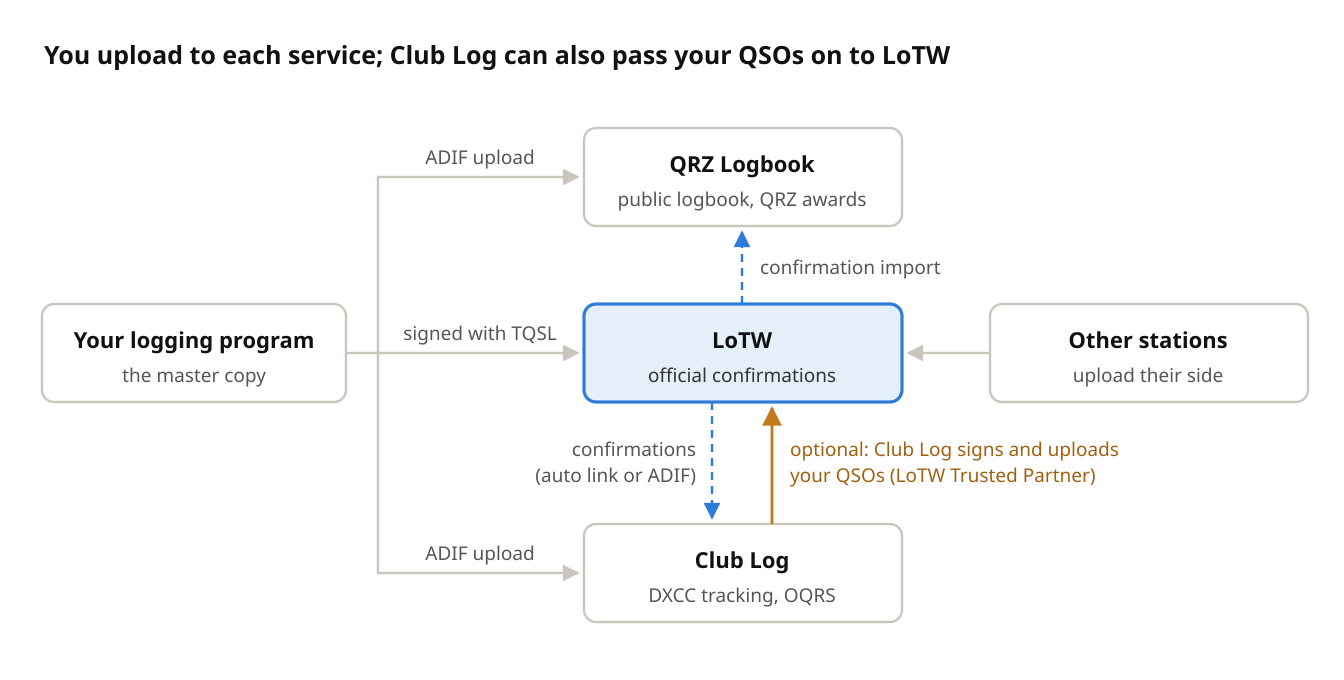
Grey arrows are uploads you make. Dashed blue arrows are confirmations copied out of LoTW. The orange arrow is Club Log uploading your QSOs to LoTW for you, if you turn it on.
- Your log → each service. You upload to each one separately, from your logging program or by hand. A QSO you only sent to QRZ will never appear in LoTW or Club Log.
- LoTW → Club Log. Club Log can fetch your LoTW confirmations through a linked account. When that link misses QSOs, upload the LoTW confirmations report (ADIF) to Club Log by hand.
- LoTW → QRZ. QRZ Logbook can import LoTW confirmations and mark matching QSOs as confirmed. This feature may need a QRZ subscription: check your account.
- Club Log → LoTW, if you allow it. Club Log is an ARRL-approved LoTW Trusted Partner. You give it your LoTW callsign certificate, and it signs and uploads your QSOs to LoTW, server to server, without TQSL on your own computer.
- QRZ → LoTW: never. QRZ isn’t a Trusted Partner, so it can’t sign QSOs for LoTW.
Uploading your logs
Treat your own logging program as the master copy, and send the same ADIF to all three services from it. Never edit a QSO in one service and expect the change to reach the others.
One-off setup
- LoTW: request a callsign certificate from ARRL through TQSL. Non-US stations post or upload proof of licence and ID. It can take a week or two. Back up the certificate file (
.p12) once it’s installed. - LoTW: in TQSL, set up a Station Location for each place you operate from: callsign, grid, ITU/CQ zones, and any POTA or portable details.
- QRZ: create your logbook at qrz.com. Under its settings, copy your Logbook API key if your logging program can upload directly.
- Club Log: register at clublog.org. Set an application password for automatic uploads, and add your callsign and its DXCC history (e.g. a period operating from another country).
- Club Log: link your LoTW account so Club Log can fetch your confirmations. If the link misses some, upload your LoTW confirmations by hand (see Every month or so).
- Club Log (optional): add your LoTW callsign certificate to Club Log so it can sign and upload your QSOs to LoTW for you. This saves running TQSL after every session, but it means Club Log holds a copy of your certificate. ARRL checks Trusted Partners’ security, so this is an accepted way to do it. If you’d rather keep the certificate on your own computer, carry on with TQSL.
After each session
- Check the log for typos, wrong bands and missing contacts before uploading anything.
- LoTW: in TQSL, choose Sign a log and upload it and pick the right Station Location. TQSL skips QSOs it has already signed, so re-uploading a whole log is safe. If Club Log is uploading to LoTW for you (setup step 6), skip this step.
- QRZ and Club Log: upload the same ADIF file. Most logging programs (WSJT-X add-ons, Log4OM, N1MM+, etc.) can do this automatically after each QSO.
Every month or so
- Download confirmations from LoTW (Your QSOs → Download Report, ADIF) and upload that file to Club Log. This marks contacts as confirmed in Club Log even if its automatic link has missed some.
- In QRZ, run its LoTW confirmation import if your subscription includes it.
- Compare the DXCC totals in LoTW and Club Log. A big gap usually means a missing upload, not missing confirmations.
Applying for an award
Apply in LoTW (Awards → DXCC). It lists your confirmed entities and you pick the ones to claim. Neither Club Log nor QRZ can submit an ARRL award for you.
Common problems
“Club Log shows fewer confirmed than LoTW.” Club Log hasn’t seen the latest LoTW confirmations yet. Download the LoTW confirmations report and upload it to Club Log, as in the monthly steps above.
“LoTW says I worked them but it’s not confirmed.” The other station hasn’t uploaded, or their log doesn’t match yours. Check the time, band and mode for that QSO. Many DXpeditions upload weeks or months later.
“My worked total is different in every service.” Some services may be missing some QSOs, or they assign a few calls to different DXCC entities (see Why the numbers never quite agree). Upload the same full ADIF everywhere before comparing.
“I fixed a typo but the old QSO is still there.” Fixing a QSO in your logging program doesn’t change the copies already uploaded. Delete the wrong QSO in QRZ and Club Log by hand. In LoTW you can’t delete it: upload the corrected QSO and the wrong one simply never matches.
“Will uploading twice create duplicates?” No for LoTW and Club Log: both ignore duplicates. QRZ usually rejects exact duplicates, but a QSO with a slightly different time can come in as a second entry.
Portable and compound calls (e.g. HB0/SP6LUT, G8GDS/P). Log the call exactly as the station sent it. In LoTW, sign /P and DX-prefix operations with a Station Location that matches. A missing or wrong prefix is a common reason a contact doesn’t confirm.
Clocks. Keep your computer clock accurate. It matters for FT8 decoding anyway, and a clock more than 30 minutes out stops every QSO from matching.
Document control
| Version | Date | Change |
|---|---|---|
| 1.0 | 18 Oct 2026 | First published. |
| 1.1 | 18 Oct 2026 | Corrected: Club Log can sign and upload QSOs to LoTW, as an ARRL LoTW Trusted Partner (ARRL announcement). Updated the summary, the confirmations table, How they sync and its diagram, and the setup and after-session steps. Thanks to Peter Taylor, who kindly pointed this out. |